Advertisement
कैश मेमोरी क्या है? और इसके प्रकार - Cache Memory in Hindi
|
1 views

Hello दोस्तों! आज हम इस post में cache memory के बारें में पढेंगे. यह computer organization का एक important टॉपिक है तो चलिए शुरू करते है.
कैश मेमोरी क्या है? - Cache Memory in Hindi
Cache memory कंप्यूटर की सबसे तेज़ गति से काम करने वाली memory होती है. इसे CPU और RAM के बीच में लगाया जाता है ताकि CPU की speed और performance बेहतर हो सके. यह एक volatile memory है, यानी जैसे ही computer बंद होता है इसमें stored data अपने आप delete हो जाता है.
Cache memory में वही data store किया जाता है जिसे CPU बार-बार इस्तेमाल करता है. जब भी CPU को कोई data चाहिए होता है, वह सबसे पहले उसे cache memory में ढूंढता है. अगर data वहाँ मिल जाए तो CPU को RAM तक जाने की जरूरत ही नहीं पड़ती, इससे processing बहुत तेज़ हो जाती है.
Advertisement
यह memory semiconductor पदार्थ से बनाई जाती है और इसे केवल CPU ही access कर सकता है, कोई दूसरा device नहीं.
कैश मेमोरी के प्रकार - Types of Cache Memory in Hindi
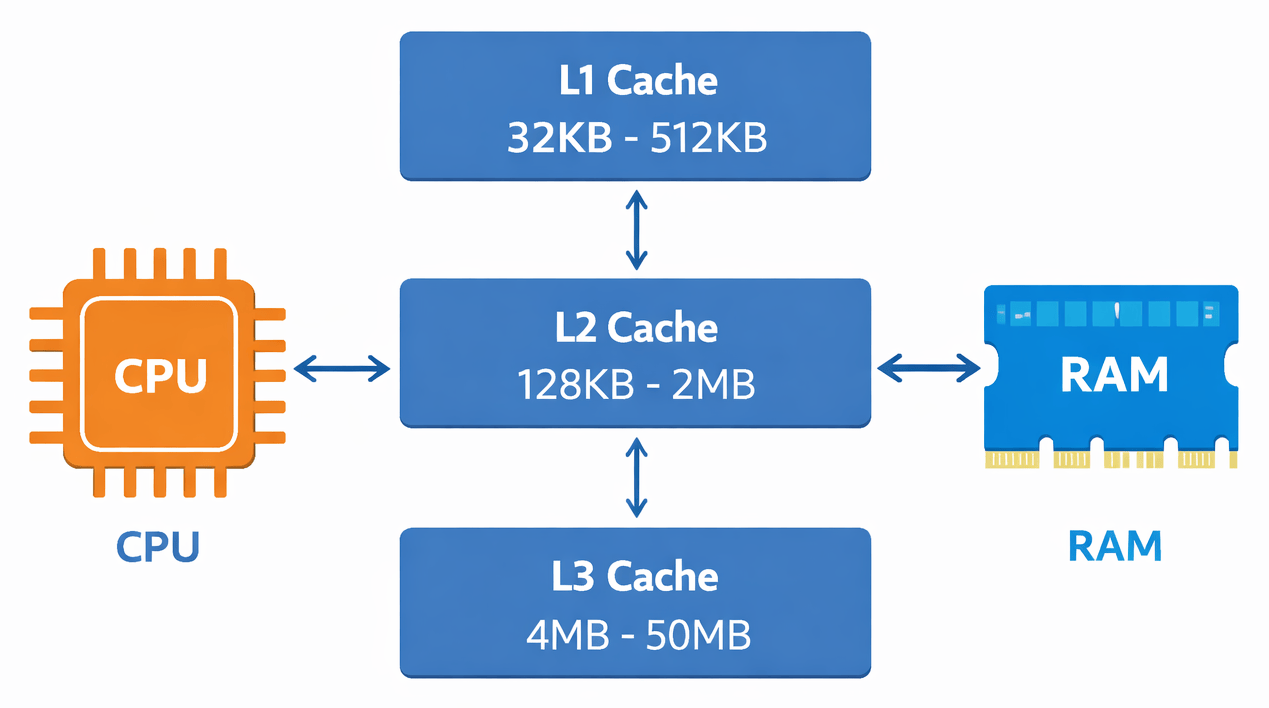
Cache memory तीन levels में होती है. तीनों एक दूसरे से speed और size में अलग होते है.
level 1 cache in Hindi
L1 cache तीनों में सबसे fast होती है और size में सबसे छोटी भी. यह सीधे CPU के अंदर built-in होती है और CPU के हर core में अलग से मौजूद होती है. इसका size 2KB से 64KB तक होता है.
Advertisement
जब CPU को किसी data की जरूरत होती है तो वह सबसे पहले यहीं check करता है. अगर data L1 में मिल जाए तो CPU आगे के levels को check ही नहीं करता.
level 2 cache in Hindi
L2 cache, L1 की तुलना में size में बड़ी होती है और speed थोड़ी कम होती है. यह CPU के अंदर या बाहर कहीं भी हो सकती है. इसका size 256KB से 512KB तक होता है. L1 में data नहीं मिलने पर CPU यहाँ search करता है.
level 3 cache in Hindi
L3 cache सबसे बड़ी होती है लेकिन तीनों में सबसे slow भी. यह सभी CPU cores के बीच shared होती है जबकि L1 और L2 हर core के लिए अलग होती है. सभी high-end CPUs में L3 cache नहीं होती, यह mostly powerful processors में ही मिलती है. इसका size 1MB से 8MB तक होता है और इसका काम L1 तथा L2 की performance को support करना है.
Cache hit और Cache miss in Hindi
जब CPU किसी data को cache memory में ढूंढता है और वह data वहाँ मिल जाता है, तो उसे Cache Hit कहते है. इस situation में CPU बहुत तेज़ी से काम कर पाता है.
लेकिन जब cache memory में वह data नहीं मिलता, तो उसे Cache Miss कहते है. ऐसे में CPU को RAM में और फिर जरूरत पड़े तो hard disk में data ढूंढना पड़ता है. यह process ज़्यादा time लेती है, इसलिए system slow हो जाता है.
कैश मेमोरी कैसे काम करती है? - How does cache memory work?
Cache memory की working को step-by-step समझते है.
- Processing के दौरान जब CPU को किसी data की जरूरत होती है तो वह सबसे पहले L1 cache में देखता है.
- अगर data L1 में मिल जाए तो उसे तुरंत CPU को दे दिया जाता है, यह Cache Hit है.
- L1 में नहीं मिला तो L2 cache check होती है, फिर L3 check होती है.
- किसी भी cache level में data नहीं मिलने पर CPU RAM में search करता है.
- RAM में भी data नहीं है तो CPU secondary memory यानी hard disk से data लाता है. यह सबसे slow process है.
- एक बार data RAM से मिलने पर उसे cache memory में load कर दिया जाता है ताकि अगली बार fast access हो सके.
पहली बार जब computer या कोई application start होती है तो cache में कुछ नहीं होता. उस time CPU को directly hard disk से data लेना पड़ता है. इसीलिए पहली बार कोई program थोड़ा slow खुलता है और दूसरी बार fast खुलता है.
कैश मेमोरी कैसे काम करती है? - How does cache memory work?
Speed: यह computer की सबसे तेज़ memory है. किसी भी दूसरी memory से ज़्यादा fast data access होता है इसमें.
Temporary Storage: इसमें data permanently store नहीं होता. Computer बंद होते ही data नष्ट हो जाता है.
Capacity: Cache memory बहुत कम data store कर सकती है. इसकी capacity काफी limited होती है.
Cost: यह memory काफी महंगी होती है. Manufacturing cost ज़्यादा होने की वजह से इसे कम capacity में ही बनाया जाता है.
Size: Size में यह बहुत छोटी होती है. CPU के अंदर ही built-in रहती है.
कैश मेमोरी के लाभ - Advantages of cache memory in Hindi
- यह computer की सबसे fast memory होती है जो सभी काम तेज़ गति से करती है.
- Main memory की तुलना में इसे बहुत कम समय में access किया जा सकता है.
- Programs और instructions को यह memory कम समय में execute करती है.
- इसमें L1, L2 और L3 जैसे multiple levels होते है जो performance को और बेहतर बनाते है.
- यह memory काफी lightweight होती है.
कैश मेमोरी के नुकसान - Disadvantages of cache memory in Hindi
- Cache memory अन्य memories की तुलना में बहुत महंगी होती है.
- इसकी storage capacity बहुत कम होती है, बहुत कम data ही store हो पाता है.
- यह data को permanently store नहीं कर सकती, power जाते ही सब delete हो जाता है.
निवेदन:- अगर आपके लिए Cache memory in Hindi का यह आर्टिकल helpful रहा हो तो इसे अपने friends के साथ अवश्य share कीजिये. और आपके जो भी questions है उन्हें comment के द्वारा बता सकते हैं. thanks.